Outgoing webhooks
An outgoing webhook sends a signed HTTPS request to another system whenever something changes in a project: an issue is created, updated, commented on or deleted, or a wiki page is saved. Use it to post to a chat channel, start a build, or keep another tool in step. Changes made in the web interface, through the REST API and by AI agents over MCP all send the same events.
Create a webhook
You need the Manage project settings permission in the project. Open the project's Settings → Webhooks tab and choose New webhook:
- Payload URL: where to send the requests. It must start with
https://, and it may not point into a private network (see Addresses Specivo refuses). - Events: one or more of the events below. The dialog and the delivery log show them by label:
Issue created, Issue updated, Issue commented, Issue deleted, Wiki page updated, and
Test event for
ping. - Include private issues and private notes: shown to administrators only; see Private content.
After you save, Specivo shows the Signing secret once. Copy it into the receiving system: it is not shown again. To replace it, open the webhook with Edit and choose Generate a new secret; the old secret stops working at once.

Each webhook has these actions: Delivery log, Send test (sends a ping event, even to a
disabled webhook), Disable / Enable, Edit and Delete (which also deletes its
delivery log).
The REST API offers the same under /api/v1/projects/{key}/webhooks/, with the same permission.
Through the API you may also set your own secret (16 to 100 characters) instead of a generated one,
with secret on create or update; rotate_secret: true generates a new one. The secret is in the
response only when it was just set.
Events
| Event | Sent when |
|---|---|
issue.created |
An issue is created. |
issue.updated |
An issue's fields are changed, or notes are added with an update. Adding or removing attachments or relations, and the commits, branches and pull_requests metadata a repository integration fills in, send no event. |
issue.commented |
A comment is added to an issue. |
issue.deleted |
An issue is deleted. |
wiki.page.updated |
A wiki page is created, and every time a new version of it is saved. The Home page Specivo creates on its own sends nothing. |
ping |
You choose Send test. It cannot be subscribed to. |
An event is sent only after the change is saved: a change that fails and is rolled back sends nothing. Data brought in by an import sends no events.
Payload
Every request is a POST with a JSON body of this shape:
| Field | Holds |
|---|---|
event |
The event name, as above. |
delivery_id |
The delivery's id, a UUID; the same as the X-Specivo-Delivery header. |
occurred_at |
When the change was made, in UTC. |
project |
key and name of the project. |
actor |
id, login and display_name of the person (or agent account) who made the change; null when Specivo made it on its own, such as a recurring task replacing an occurrence. |
data |
The event's data, below. |
data for each event:
| Event | data |
|---|---|
issue.created |
issue: the issue, with the fields of the REST API's issue object (GET /api/v1/issues/{key}/ without its child issues and other extras). |
issue.updated |
issue; changes: each changed field with its old and new value; journal_id: the history entry the update wrote; notes: the notes added with the update, or null. |
issue.commented |
issue; comment: the comment, as the issue's journal API returns it. |
issue.deleted |
issue: the issue as it was just before it was deleted. |
wiki.page.updated |
page: the page with its text; comments: the edit summary, or null; created: true for a new page. |
ping |
webhook_id and message. |
In changes, issue fields are named as in the API (status_id, assigned_to_id, subject, …) and
values are given as the issue history stores them: ids as strings, the full text for
description.
Example: an issue event
issue.updated, after an issue was set to In Progress and assigned:
{
  "event": "issue.updated",
  "delivery_id": "075a0356-82da-473f-80ab-0e0c10f6dce5",
  "occurred_at": "2026-10-30T22:04:28.014132Z",
  "project": {"key": "ACME", "name": "Acme Website"},
  "actor": {"id": 4, "login": "alex", "display_name": "Alex Example"},
  "data": {
    "issue": {
      "id": 1,
      "key": "ACME-1",
      "project_key": "ACME",
      "subject": "Add the login form",
      "description": null,
      "tracker": {"id": 2, "name": "Feature"},
      "status": {"id": 2, "name": "In Progress"},
      "priority": {"id": 2, "name": "Normal"},
      "category": null,
      "author": {"id": 4, "name": "Alex Example"},
      "assigned_to": {"id": 4, "name": "Alex Example"},
      "fixed_version": null,
      "fixed_version_id": null,
      "parent_id": null,
      "root_id": 1,
      "lft": 1,
      "rgt": 2,
      "sprint_id": null,
      "start_date": null,
      "due_date": null,
      "done_ratio": 0,
      "estimated_hours": null,
      "original_estimate": null,
      "remaining_estimate": null,
      "is_private": false,
      "metadata": {
        "commits": [
          "25031421b3a7f0640165a835b52ef48e76f49e1f",
          "826674632415a1a29012a1c1c594cf4ba01a2e17"
        ],
        "branches": ["feat/ACME-1-add-the-login-form"],
        "pull_requests": ["https://github.example.com/example-org/website/pull/14"]
      },
      "lock_version": 5,
      "created_at": "2026-10-30T22:02:55.722698Z",
      "updated_at": "2026-10-30T22:04:27.751427Z"
    },
    "changes": {
      "status_id": {"old": "1", "new": "2"},
      "assigned_to_id": {"old": null, "new": "4"}
    },
    "journal_id": 6,
    "notes": null
  }
}
issue.created and issue.deleted carry only issue. issue.commented carries issue and
comment:
"comment": {
  "id": 7,
  "sequence": 6,
  "issue_id": 1,
  "user": {"id": 4, "name": "Alex Example"},
  "notes": "Ready for review.",
  "details": [],
  "is_private": false,
  "reply_to_id": null,
  "is_resolved": false,
  "resolved_at": null,
  "resolved_by": null,
  "resolved_summary": null,
  "created_at": "2026-10-30T22:04:28.056324Z",
  "updated_at": "2026-10-30T22:04:28.056324Z"
}
Example: a wiki event
{
  "event": "wiki.page.updated",
  "delivery_id": "b50a35ae-d784-4f03-9a08-9a3a256efe77",
  "occurred_at": "2026-10-30T22:04:28.328618Z",
  "project": {"key": "ACME", "name": "Acme Website"},
  "actor": {"id": 4, "login": "alex", "display_name": "Alex Example"},
  "data": {
    "page": {
      "id": 1,
      "slug": "release-checklist",
      "title": "Release checklist",
      "text": "1. Tag the release",
      "parent_id": null,
      "protected": false,
      "lock_version": 1,
      "content_version": 1,
      "content_author": {"id": 4, "name": "Alex Example"},
      "content_updated_at": "2026-10-30T22:04:28.269006Z",
      "created_at": "2026-10-30T22:04:28.269006Z",
      "updated_at": "2026-10-30T22:04:28.269006Z"
    },
    "comments": "First draft",
    "created": true
  }
}
Example: the test event
{
  "event": "ping",
  "delivery_id": "3354d211-011b-44af-a802-906c38bc9827",
  "occurred_at": "2026-10-30T22:04:27.653584Z",
  "project": {"key": "ACME", "name": "Acme Website"},
  "actor": {"id": 4, "login": "alex", "display_name": "Alex Example"},
  "data": {"webhook_id": 2, "message": "Test event sent from Specivo."}
}
The issue and page objects follow the REST API, so new fields can appear in them over time. Read the fields you need and ignore the rest.
Headers and the signature
| Header | Value |
|---|---|
Content-Type |
application/json; the body is UTF-8. |
User-Agent |
Specivo-Webhook/1 |
X-Specivo-Event |
The event name, such as issue.updated. |
X-Specivo-Delivery |
The delivery id, the same as delivery_id in the body. |
X-Specivo-Signature |
sha256= followed by the hexadecimal HMAC-SHA256 of the body, keyed with the signing secret. |
To check that a request comes from Specivo and was not changed on the way, compute the HMAC of the raw body bytes as you received them, before any JSON parsing, and compare it with the header in constant time. Parsing the JSON and serialising it again changes the bytes, and the signature no longer matches.
Python:
import hashlib
import hmac


def is_valid(secret: str, body: bytes, signature: str | None) -> bool:
    """True when *signature* (the X-Specivo-Signature header) matches *body*."""
    expected = "sha256=" + hmac.new(secret.encode(), body, hashlib.sha256).hexdigest()
    return hmac.compare_digest(expected.encode(), (signature or "").encode())
In Flask the raw body is request.get_data(); in FastAPI or Starlette, await request.body().
Node.js:
const crypto = require("node:crypto");

function isValid(secret, body, signature) {
  // body: the raw request body as a Buffer, before any JSON parsing
  const expected = "sha256=" + crypto.createHmac("sha256", secret).update(body).digest("hex");
  const a = Buffer.from(expected);
  const b = Buffer.from(signature || "");
  return a.length === b.length && crypto.timingSafeEqual(a, b);
}
With Express, read the body with express.raw({ type: "application/json" }) on the webhook route,
so req.body is the Buffer.
Answer an invalid signature with an error and do nothing else.
Delivery, retries and duplicates
Deliveries are sent in the background, one at a time per delivery, shortly after the change is saved. A 2xx answer means delivered. Anything else:
| Result | What happens |
|---|---|
| A connection error, a timeout, a host name that does not resolve, 5xx, 408 or 429 | Tried again later. |
| A redirect (3xx) or any other 4xx | Failed at once; not tried again. Redirects are never followed. |
| An address Specivo refuses, an invalid port, a secret that can no longer be read, or an unexpected error in Specivo | Failed at once, without sending. |
A delivery is tried at most 8 times. Retry n waits 30 seconds × 2n−1, at most one hour, plus up to a quarter more at random, so retries spread out: about 30 s, 1, 2, 4, 8, 16 and 32 minutes after the previous attempt. After the eighth attempt the delivery is failed. Each attempt may take 30 seconds per step of the request (connecting, sending, reading) and 60 seconds in all. Specivo keeps at most the first 4096 bytes of the answer, for the log.
Retries of one delivery carry the same X-Specivo-Delivery id and the same body. A delivery
can arrive more than once (a slow answer that Specivo counted as a timeout, for example), so use
the id to recognise one you have already handled. Deliveries can also arrive out of order; use
occurred_at, or read the current state from the API, when order matters.
If the task queue is down when a change is saved, the delivery waits as pending and is sent once the queue is back: nothing is lost. Expect a delay of about five minutes or more in that case, as Specivo first waits to be sure the original attempt is not still running.
A disabled webhook receives nothing: deliveries still waiting when it is disabled fail with "The webhook is disabled; not sent." Send test works on a disabled webhook, to check the receiver before you enable it.
Addresses Specivo refuses
Every attempt looks up the host name and refuses to send when any of its addresses is private, loopback, link-local or otherwise not public. It then connects to the address it checked. A URL written with such an address is refused when you save the webhook. So a webhook cannot be used to reach machines inside your network, even if its DNS record changes later. Proxy settings in Specivo's environment are not used for webhooks.
Private content
By default a webhook never receives anything about private issues (no event for them at all, including comments on them and their deletion) or private notes. An update that makes an issue private, or public, counts as private too.
Only an administrator can turn on Include private issues and private notes, because only administrators can see every private issue. A project manager who is not an administrator cannot create such a webhook, and cannot edit, disable, enable or re-key a webhook that has it on. They can still see it listed, marked includes private content, read its delivery log, send it a test event and delete it. Wiki events are never private.
The delivery log
Delivery log on a webhook's row lists its deliveries, newest first:
| Column | Shows |
|---|---|
| Time | When the event was created. Hover over it to see the delivery id. |
| Event | The event. |
| Status | Pending (waiting for its first attempt or a retry), Succeeded or Failed. |
| Attempts | Attempts made so far. |
| Response code | The HTTP status of the last answer; – when there was none. |
| Response | Why the last attempt failed, and the start of the receiver's answer. |
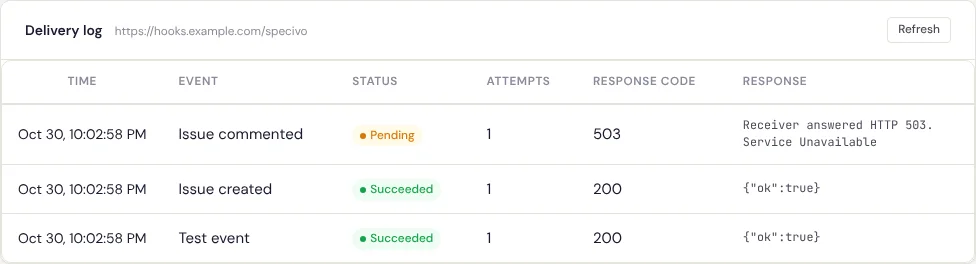
Messages you may see under Response:
| Message | Meaning |
|---|---|
| Receiver answered HTTP code. | The receiver did not answer 2xx. |
| Timed out after N seconds. / Timed out: no full answer within 60 seconds. | The receiver is too slow. Answer quickly and do the work afterwards. |
| Connection failed: error. | The receiver could not be reached. error is the kind of failure, such as ConnectError. |
| Could not resolve host name. | The host name does not resolve (yet). Retried. |
| The host resolves to a private, loopback or reserved address; not sent. | See Addresses Specivo refuses. |
| The webhook URL has an invalid port; not sent. | Fix the URL. |
| The webhook is disabled; not sent. | The webhook was disabled before the delivery was sent. |
| The webhook secret cannot be read with the current SECRET_KEY; set a new one. | The instance's SECRET_KEY changed. Generate a new secret. |
| Delivery failed: error. | An unexpected error in Specivo; error is its kind. Not retried; tell your administrator. |
Succeeded and failed deliveries are deleted after 30 days. Pending ones are kept until they are
settled. The REST API returns the same log from GET /api/v1/projects/{key}/webhooks/{id}/deliveries/,
and POST /api/v1/projects/{key}/webhooks/{id}/test/ sends a test event.
The per-step timeout is set by your administrator with WEBHOOK_TIMEOUT; see
Configuration.
To receive events from a forge instead, see Repository integrations.